

Communication channel

Route web requests through service workflows

iService Custom Forms collect the details required by each service process. Every submitted field becomes an interaction property for routing, search, and reporting. Workflow Automation creates queued service work from the submission. Teams assign, escalate, and follow the request through the configured process.

A customer filling one upright structured form whose evenly spaced fields seat each detail in place, with a completed form travelling into work behind

Complete service requests at intake

Service request forms capture required details, deadlines, and product preferences at submission.

iService Custom Forms collect required request details at submission. Picklists and text, date, date-time, number, integer, and list properties capture deadlines and product preferences in structured formats. Teams receive a request with routing and action context.

One submitted request whose supplied details reappear unchanged wherever the team later looks

Form fields in the service workflow

Submitted Custom Form fields become interaction properties used throughout the service workflow.

Each Custom Form field becomes an interaction property for routing, search, and reports throughout the request. Workflow Automation uses the submission to create a queued follow-up ticket. The workflow moves work through assignment and escalation. Contact details and preferences drive targeted follow-up, mailing lists, or scheduled nurture campaigns.

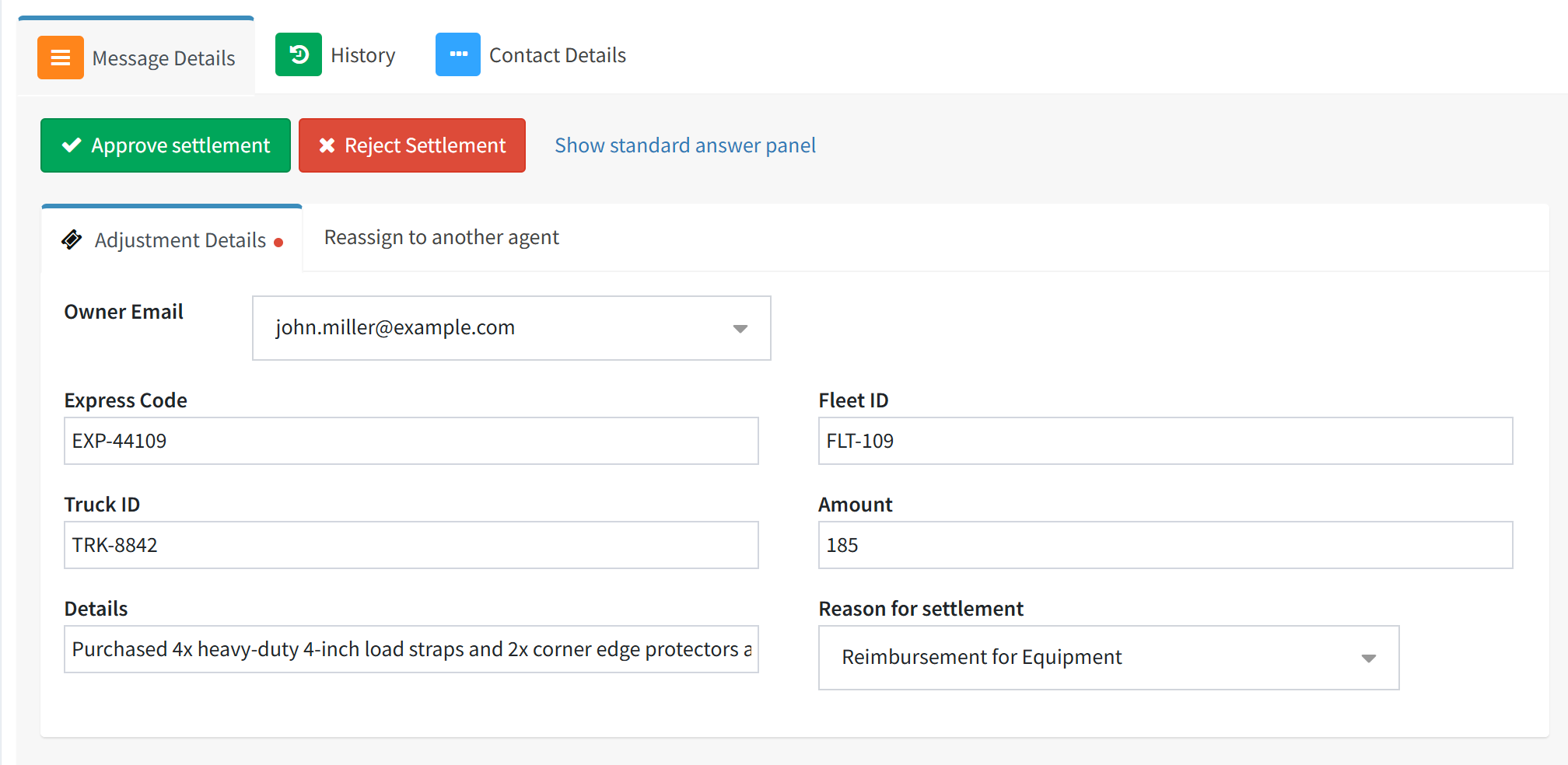
iService settlement approval form showing submitted adjustment fields such as Fleet ID, Truck ID, amount, and reason

A submitted service request

A submitted form creates a queued request, customer notification, and assigned service action.

A customer submits a form with a deadline and product preference. The fields become interaction properties, and Workflow Automation creates a queued follow-up ticket. The workflow assigns the request, sends the customer an automatic notification, and records each process step. The agent works from the submitted details.

Configurable form fields and workflow tests

Custom Form fields use configured property types and test data verifies the connected workflow.

iService Custom Forms use configurable field types for structured request values. Teams build and maintain forms as HTML, then submit test data to verify the connected workflow before deployment. The form remains connected to the properties, routing, and process that use its values.

Request-specific forms and workflows

Different request types collect different details and move through different follow-up paths.

iService gives each request type a configurable form and workflow. Custom Forms collect the details for that process, and Workflow Automation defines assignment, escalation, and follow-up. Teams use structured request intake for each service path.

iService features on this page

  • Custom web forms and landing pagesBuild a public form or landing page in the page editor and publish it on your own domain.
  • Custom question formsCreate custom forms that create customer tickets with unlimited customization.
  • Customer question form wizardiService forms wizard creates customized forms that included any contact or interaction property.
  • Customer submit forms from workflowA no-code form builder for creating submission forms.
  • Portal ticket submissionBuiltin customer portals include ask a question forms that automatically capture required information, like severity or language.
  • Submission panelsBuild the form a customer or agent submits, with the fields and validation you choose.
  • Panel inputsText, rich text, uploads, agent pickers, email addresses, SMS opt-in, and property fields.
  • Custom date pickersDate properties appear as a date picker for a single date, a date and time, a date range, or multiple dates, with optional earliest and latest dates.
  • Conditional displayShow or hide an element based on a property value, a variable, or who is viewing the panel.
  • Interactive data objectsThe grid interaction property type adds a table of values, such as a bill of materials or a price estimate, to a workflow form.
  • Data filesUpload a data file and use its rows to fill a dropdown or look up a value in a workflow.
  • Workflow mappingMap a panel input to the contact property, interaction property, or variable it writes to.
  • Interaction propertiesDefine the fields kept on a message or chat, such as order number or case type.
  • Accept file attachmentsFile attachments are saved in the iService database and made part of the ticket.
  • Submission actionsSet contact and interaction properties, email the customer, or create a ticket when a form is submitted.
  • Customer and agent ticketsA customer raises a ticket from a portal or form, and an agent raises one on the customer’s behalf.
  • Workflow topicsChoose the topics a workflow may file an interaction under.
  • Agent listsDefine the set of agents a workflow may assign to or show in an agent picker.
  • Secure approval mechanismSubmit a request through a workflow form and queue it for the users authorized to approve it. They open the ticket and click Approve or Reject.
  • Workflow inboxes and calendarsCreate an inbox or calendar view that shows only the submissions a team works from.
  • WebhooksA Webhook action in filters and forms passes interaction details to other systems.
  • Embedded paymentsTake a payment inside a form, without sending the customer elsewhere.
  • WebsitesRegister the domains that may host your forms and chat windows.
  • Forms administrationList every published form, see where it is deployed, and change its settings.
  • Workflow templatesStart a new workflow from a template instead of an empty page.
  • Workflow import and exportExport individual panels, property definitions, and templates, then import them to reuse in another workflow.
  • Custom CSS on customer submit formsAdd your own CSS to any customer submit form. iService places it in the page head, so you enter the rules without a style tag.
  • Conditional actionsTurn on Run Conditionally for a workflow action and it runs only when a property of the interaction, case, customer, or submitter meets your condition, so one workflow handles different requests differently.
  • Input sizingsSet each input to a full-width or half-width column so two inputs sit side by side, set the width of the input itself, and fix a width that stays the same on small screens.
  • Payment button in workflow panelsAdd a Payment button to a workflow panel. iService fills the payer name, address, and amount from the interaction properties.

Request an iService demo

iService Custom Forms turn submitted fields into interaction properties, queued follow-up tickets, and workflow actions.

Request a Demo

Chat with support