

Platform

Use iService® Copilot to draft replies with a single click.

Use your organization's instructions and generative AI to draft replies to customer questions, directly in iService.

A guided answer panel presenting task-specific inputs and actions beside an interaction

Automate replies using your own instructions and business rules

Copilot drafts a first reply so your agent starts from a working answer, not an empty editor.

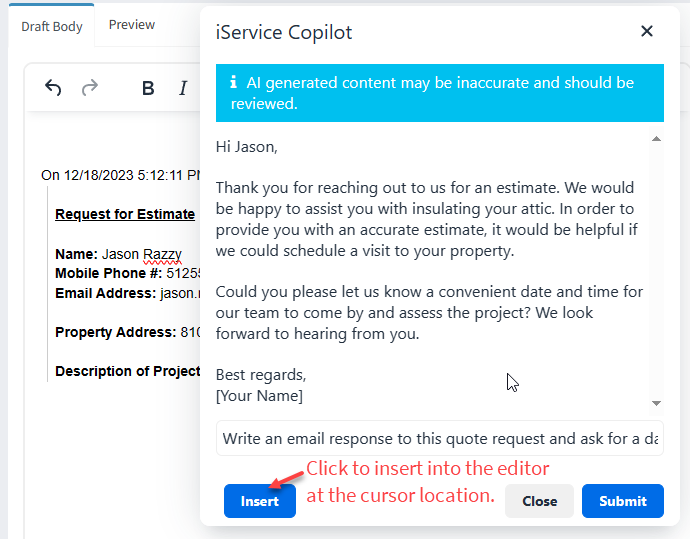
Select a pre-written AI prompt, and submit it. Copilot sends the customer questions and the prompt to OpenAI, and returns a draft ready for review and sending. The agent can leverage copilot to finalize the response, and then send it with a single click.

Reply drafts
  1. Select a promptChoose a pre-written AI prompt for the reply.
  2. Submit to CopilotCopilot sends the customer's question and the prompt to OpenAI and returns a draft.
  3. Insert and sendInsert the draft, modify it as needed, and send the reply.

Message summaries

Some customer emails can be very long, and in logistics important details might be in the initial messages of the thread. It's not efficient for your agents to read through pages of detail to find a single fact.

Select the text of the message in the editor and choose Summarize. Copilot returns the key points in a few lines, so your agent sees what the customer is asking for and answers it directly instead of rereading the whole thread. Agents can continue the chat and ask for details like the best phone number or address.

A durable customer interaction record connecting message, history, ownership, and status

Clearer wording

Copilot's writing tools work on text your agent has already written or pasted.

Select any text in the reply and pick a writing option. Copilot can fix spelling and grammar, simplify dense language, trim a passage that runs long, or shift the tone, all while keeping the original meaning. The revised text comes back ready to insert.

  • Improve and simplify: Correct grammar, simplify complex language, or trim a passage that runs long, without changing what it says.
  • Set the tone: Rewrite the same text as professional, casual, direct, confident, or friendly to match the conversation.

In-editor assistance

Copilot's buttons sit in the same rich text editor your agents already use to write replies.

Once your OpenAI integration is configured, the prompt window and writing tools appear in the editor toolbar. Agents reach every Copilot feature, drafting, summarizing, and rewriting, without leaving the interaction or opening another tool, and each result lands in the reply for a final review before it is sent.

The iService Copilot prompt window showing a generated draft for the agent to review before sending

iService features on this page

  • AI provider configurationEnter your OpenAI or third-party API key and choose the model iService uses to generate answers.
  • iService CopilotCopilot drafts an answer from your knowledge base and past responses. The agent edits it before sending.
  • Chatbot answersA chatbot answers chat questions from your content and hands the conversation to an agent on request.
  • Custom AI prompts for agentsWrite the prompts agents run against a question, and publish them by segment.
  • Interaction search chatSearch interactions by contact, topic, subject, or another field; optionally sort the results by semantic relevance; then chat with up to 900,000 characters of the ordered results.
  • Content analysisClassify incoming messages and score their content so filters and workflows can act on the result.
  • iService AI CopilotThe AI button in the article editor drafts new text from your prompt, or summarizes, improves, or simplifies the text you select. Click Insert to add the result to the article.
  • Full semantic interaction searchTurn on semantic relevance in interaction search and iService orders the results by how closely each one matches the meaning of your search, with a relevance score from -1.0 to 1.0.
  • Chat with interaction search resultsClick Ask iService to send the most relevant search results to an AI chatbot, then ask questions about them in plain language or request the answer as a table.
  • Semantic searchCustomers in the Tabs portal and agents in the knowledge base search in plain language, and iService ranks articles by meaning with a match percentage for each one.
  • Chat with AI about answersCustomers in the Tabs portal and agents in the knowledge base ask an AI chat their question, and it answers from the articles that best match it.

Review AI drafts in iService

Request a demo to see Copilot draft a reply from a customer's question, summarize a long message, and revise wording, with each result inserted into the editor for your agent to review and send.

Request a Demo

Chat with support