

Prewritten reply blocks and customer-detail chips merge into one reply that an agent adjusts and sends to a waiting customer.

Platform

Insert approved replies with customer data

Give agents consistent, approved responses to common customer questions without requiring them to write each reply from scratch.

Empower agents with their own tools

Some of your service agents have unique needs, and general pre-written responses aren't enough.

Let your agents make their own versions of stock responses and AI prompts. Managers can view and update agent responses, as well as general responses suitable for all agents in the segment.
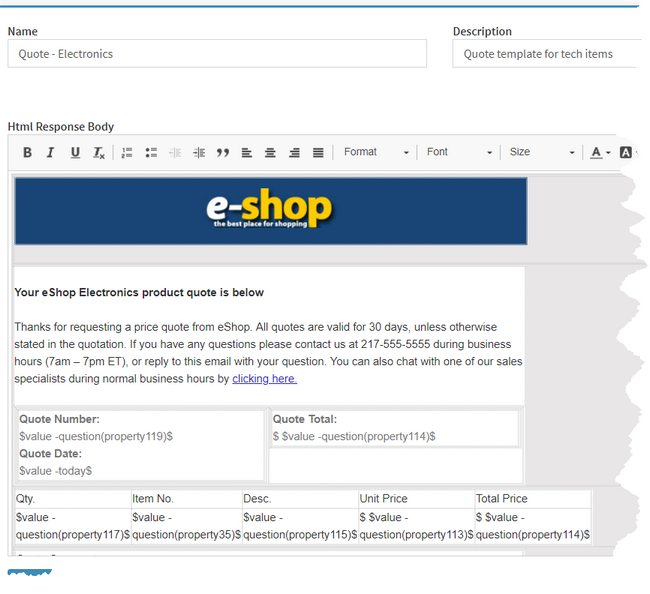
An iService stock response configured for reuse by agents

Variables in a customer reply

Personalize approved responses with customer information already captured in iService.

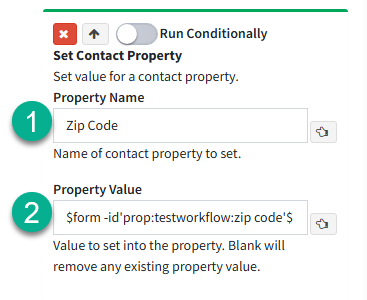
Agents insert an approved response into the reply editor, then use the variable picker to add contact, form, and interaction details. The completed response combines consistent, approved wording with information specific to the customer and interaction, while giving the agent the flexibility to review and edit the message before sending.

iService workflow variables available for insertion into a response

Shared paragraphs in connected responses

A shared paragraph appears in several approved customer responses.

iService nests stock responses inside other responses. A corrected shared paragraph updates every answer that uses it. Teams maintain repeated wording in one response and apply the updated paragraph across connected answers.

Editable replies before sending

Give agents the flexibility to tailor approved responses to the conversation at hand.

Response templates provide consistent, approved wording and can include customer-specific information from iService. Before sending, agents can review and edit the completed message to address the individual customer or situation while still starting from an approved response.

See the iService stock response library

Request a demo to see an agent insert an approved response, use the variable picker, and edit the completed reply before sending it.

Request a Demo

Chat with support